So you’ve finally tweaked your PUBG control layout to perfection, and now your buddy wants the same setup. Or maybe you’ve stumbled upon a pro’s code and want to spread the love. Sharing control codes in PUBG Mobile isn’t complicated, but there are multiple ways to do it, each with its own pros and cons. We’ve rounded up 11 methods to share your layout codes, from the built-in share button to third-party apps. These methods were chosen based on common usage, reliability, and ease of use across different devices and regions. Whether you’re on Android, iOS, or even an emulator, you’ll find a way that works for you. Let’s dive in.
1. Use the In-Game Share Feature
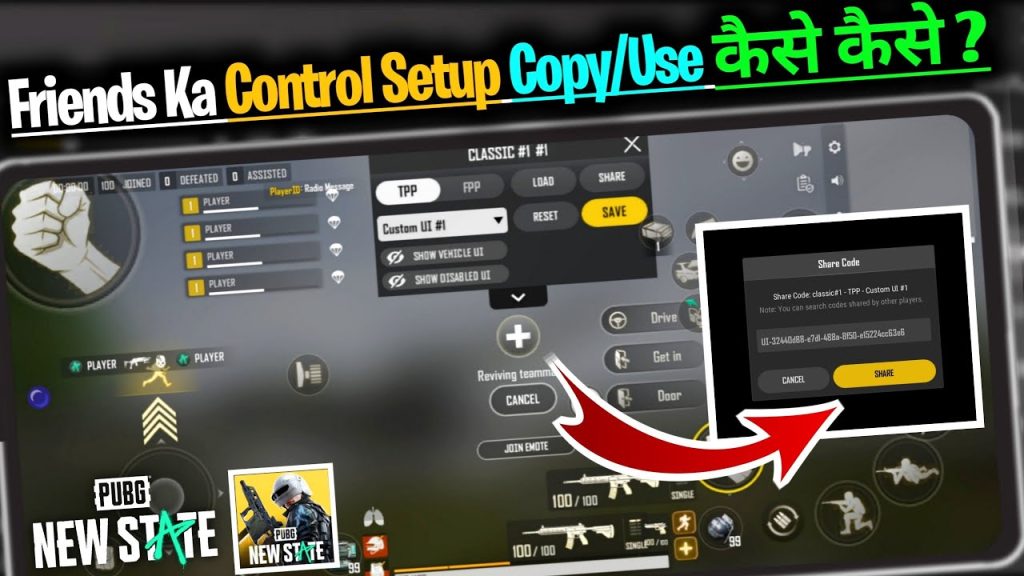
The most straightforward way is to use the share button inside PUBG Mobile. Head to Settings > Controls > Layout, then tap the share icon (usually an arrow or three dots). This gives you options to copy the code or share it directly to social apps like Facebook, WhatsApp, or Twitter. The copied code is a long string of numbers and letters—your unique layout identifier. This method is built right in, so no extra tools needed. Just make sure you’ve already exported or saved your code first if you’re sharing a custom layout that isn’t active.
2. Copy the Code to Clipboard
If you just want to grab the code and paste it into a chat, email, or note, the clipboard method is the quickest. In the same layout screen, tap ‘Copy Code’ and the string gets stored on your device’s clipboard. Then you can open any app and paste it. This is perfect for one-on-one sharing because you control exactly where it goes. No extra steps, no app permissions—just paste and send. Keep in mind that clipboard history might save old codes, so double-check you’ve pasted the right one.
3. Send via Messaging Apps
Messaging apps like WhatsApp, Telegram, and Messenger are the go-to for most players. After copying the code, simply open a chat with your friend and paste it. They’ll see the string and can import it directly into their game. If you’re in a group chat for your squad, this is a great way to share templates for different playstyles, like aggressive PUBG control codes for push strategies. Bonus: many of these apps support code formatting, so the text stands out.
4. Share on Social Media Platforms
Reddit, Facebook groups, Discord servers—there’s a whole community of PUBG players swapping codes. You can paste your code directly into a post or comment. For visibility, include a screenshot of your layout or a brief description of what the code offers (e.g., gyro settings, claw-friendly). Popular subreddits like r/PUBGMobile love seeing new layouts. This method gets your code out to many people, but be aware of spam filters or character limits on some platforms.
5. Export as a Text File and Share
For a more permanent copy, export your layout as a .txt file. In the game’s control settings, there’s usually an ‘Export’ option that saves the code to your device’s internal storage. You can then share that file via email, Bluetooth, or any file-sharing service. This method is great for backing up multiple layouts or sending a collection of codes to a friend. Plus, text files are lightweight and can be opened on any device. Just be aware that some file managers might hide the export folder, so check your Downloads or PUBG Mobile folder.
6. Use a QR Code Generator
QR codes are a convenient way to share complex strings without typing. Copy your control code, then use a free online QR generator to create a QR image. Your friend can scan the code with their phone’s camera and then copy the decoded text directly. This is especially useful for live streaming or posting on social media where a clickable link isn’t possible. Some third-party apps even create QR codes for multiple codes at once. It’s a bit extra prep, but it makes sharing seamless.
7. Upload to Cloud Storage
Cloud services like Google Drive, Dropbox, or OneDrive let you upload your exported code file and share a link. This is perfect when you need to share with multiple people or across devices. You can even create a shared folder with your squad’s best layouts. Cloud storage also acts as a backup—if you lose your phone, your codes are safe. Just be careful with link permissions; set to ‘view only’ to prevent edits. Combine this with methods to save PUBG control codes for extra security.
8. Use Code Sharing Websites
Pastebin, GitHub Gist, or dedicated PUBG code sites are awesome for sharing codes with a URL. You create a new paste, paste the code, and set an expiry if you want. Then share the link. This method is popular among content creators who include code links in video descriptions. Some sites even syntax-highlight the code. For PUBG mobile control codes after update, these sites allow you to quickly update and re-share without resending files.
9. Broadcast in Clan or Team Chat
If you’re part of a clan or team, the in-game clan chat is a natural place to share codes. You can paste the code directly into the chat. Since many players check clan messages, it’s a efficient way to distribute a new layout. You can also pin the message so it stays visible. This method works best for codes that are proven to be effective, like those from pro players. Just avoid spamming—share only when relevant.
10. Transfer via Bluetooth or Nearby Share
When you’re physically near a friend, Bluetooth or Android’s Nearby Share (or Apple’s AirDrop) can transfer the exported file directly. No internet needed. This is perfect for LAN parties or when you want to avoid data usage. Simply export the .txt file, then share it via Bluetooth or Nearby Share. The receiver imports it into PUBG. It’s old-school but reliable for close-range sharing.
11. Use Third-Party Code Sharing Apps
There are apps specifically designed for sharing game configs, like SHAREit, Xender, or even specialized PUBG layout apps. These apps create a network for quick file transfers. Some also have built-in QR scanning. While convenient for bulk sharing, be cautious of app permissions and privacy. Stick to reputable apps from official stores. These apps often work across platforms, so you can share between Android and iOS.
There you have it—11 ways to share your PUBG control codes. Whether you prefer the in-game button, a quick copy-paste into WhatsApp, or a full-on cloud storage setup, each method has its place. Try a few to see what fits your routine. And if you’re looking for new codes to try, check out our guides on how to copy PUBG control codes and PUBG control codes for Android to get started. Now go share those layouts and dominate the battlefield!



