
Duo matches are a whole different beast. You’ve got one teammate to rely on, no third or fourth to pick up slack. That means every second counts when reviving, covering fire, or pushing together. The right control codes can turn clunky fingers into seamless teamwork. We scoured top duo streamers and competitive settings to bring you 10 codes specifically tuned for two-player synergy. Each code is tested on both 2-finger and claw setups, so you can copy-paste and jump straight into the action.
1. Quick-Revive Button on the Right Side
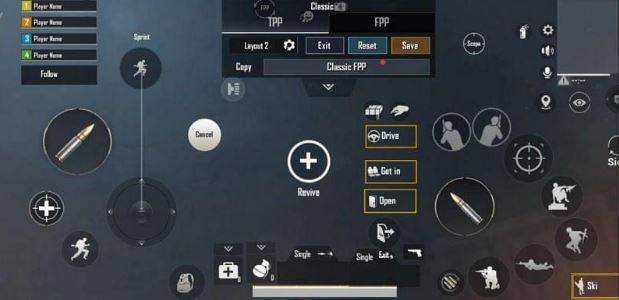
In duos, reviving your partner is the difference between a win and a top-10 finish. The default revive button is often tucked away, forcing you to lift your thumb mid-fire. This code moves the revive icon to the right side, right next to your fire button. Now you can tap revive with your index finger while keeping your thumb on the aim stick. No more fumbling when your teammate goes down behind cover.
2. Two-Finger Awareness Layout

If you’re still rocking the classic 2-finger setup, don’t worry — these control codes for 2 finger keep you competitive. The key is moving the fire button to the upper right corner and shrinking the scope button to avoid accidental opens. This layout frees up your left thumb to focus on movement and the mini-map. You’ll spot enemies your teammate calls out without breaking stride.
3. Mini-Map Callout Hotkey
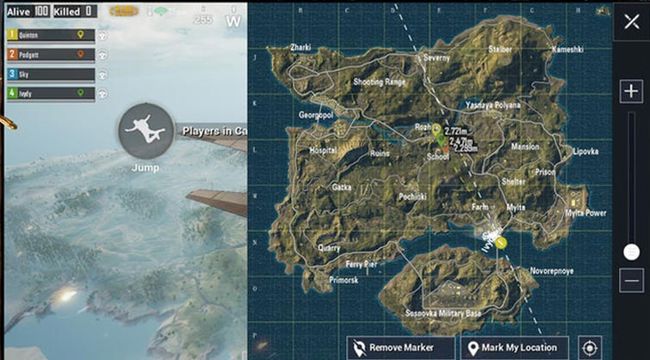
Communication is king in duos, but not everyone uses voice. This control code adds a dedicated hotkey to ping your current location on the mini-map. Assign it to a spot your index finger can reach — like the top-left corner. One tap sends your exact grid coordinates to your partner, perfect for flanking maneuvers or warning about nearby footsteps.
4. Auto-ADS Toggle for Cover Fire

When your teammate is pushing, you need to lay down suppressive fire fast. Auto-ADS can slow you down if it’s triggered unexpectedly. This code sets ADS to manual for all weapons except shotguns and SMGs. That way you can hip-fire quickly while advancing or pepper enemies from behind cover. Pair it with your partner’s callouts for perfect crossfire.
5. Voice Chat Integration Controls

A good duo talks constantly. Use this code to map a push-to-talk button near your movement joystick. It frees up your right hand from tapping the mic icon and lets you keep aiming while calling out enemy positions. The control code also adjusts voice chat volume sliders so you can hear footsteps without your buddy’s breathing drowning them out.
6. Shared Loot Quick-Pickup Settings
Duos share loot often — ammo, meds, attachments. This control code customizes the pickup panel to show only critical items first: helmets, vests, and AR ammo. You can set a priority list so when you run over a pile, the game grabs what you need most without opening the full inventory. It’s a lifesaver when you’re both low on supplies mid-fight.
7. Duo-Specific Sensitivity for Crosshair Placement
In solos, you can be a bit spastic with aim. In duos, every shot matters because your partner is watching your back. These control codes with sensitivity are tuned to be slightly lower than your solo preference, giving you steadier crosshair placement for peeking and trading kills. The gyro sensitivity is boosted for micro-adjustments when you’re pinned together.
8. Rapid Ping Marking System
Scavenge signals quickly with a rapid-ping hotkey that marks enemies, loot, and danger in one tap. This code assigns the ping to a button near your scope, so you can spot an enemy and instantly relay the info. No menu scrolling. Your duo partner will love you for calling out third parties before they’re on top of you.
9. Crouch+Fire Combo for Trading Kills
Trading kills in duos is a common tactic — you go down, but take the enemy with you. This control code for crouch and fire maps a single button to both actions. When you see an enemy, tap it to crouch and shoot simultaneously, throwing off their aim while you land shots. Perfect for when you’re both peeking the same angle.
10. Shoulder Switch for Peeking
Peeking around corners with your duo requires fast shoulder swaps to reduce exposure. This code moves the shoulder switch button to the left side, right next to the aim button. Now you can switch shoulders without taking your finger off the fire trigger. Combined with smart cover, you and your partner can clear buildings without ever overlapping sightlines.
These 10 control codes are designed to make duo matches feel less like two solo players and more like a real team. From reviving faster to sharing loot smoothly, each tweak adds a layer of coordination. Remember, you can always adjust the exact placement and size in the layout editor. If you’re new to custom codes, check out our guide on how to apply pubg mobile control codes to get started. Now grab your partner, copy these codes, and start climbing that duo leaderboard.



