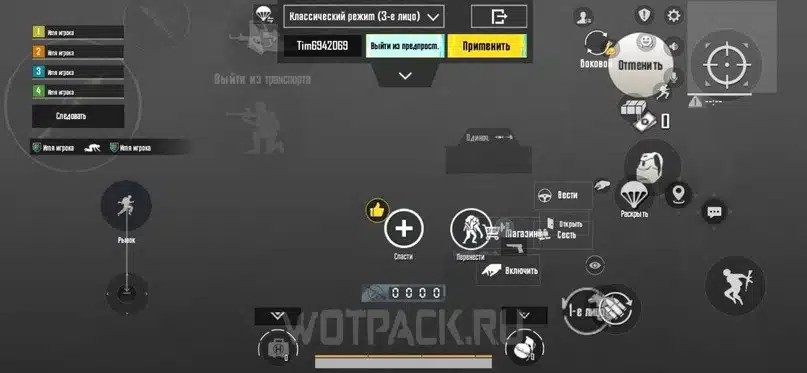
If you’re serious about PUBG Mobile, you’ve probably heard of the 6 finger claw layout. It’s the gold standard among competitive players, giving you the ability to aim, shoot, scope, crouch, jump, and peek without lifting a finger. But finding the perfect layout code can be a hassle — that’s why I’ve curated these 10 tried-and-tested codes from top YouTubers and pro players. Each code is optimized for 2025’s latest update and works on both phones and tablets. Ready to level up? Let’s dive in.
Code #1: Claw Master
This layout is all about maximizing your claw grip. Fire and scope are mapped to the top left and right corners, while movement and camera stay on the bottom. You’ll have dedicated buttons for lean, jump, and crouch right under your middle fingers. The result? Lightning-fast peek shots and smooth jiggle movements. It’s ideal for close-range duels where every millisecond counts. Give it a try if you want a pure claw experience without overcomplicating things.
Code #2: Pro Player’s Setup
Straight from a seasoned esports competitor, this code prioritizes jiggle aiming and quick scoping. The fire button is split into two zones – one for hip fire and one for scope fire – so you never accidentally ADS when you don’t need to. The crouch and prone buttons are placed near your ring fingers, letting you drop shot in an instant. If you love aggressive pushes with a 4x scope, this layout will feel like second nature.
Code #3: The Balanced Build
Not everyone wants a hyper-aggressive layout. This code offers a balanced split between combat and utility. Meds, grenades, and map are placed on the upper edges, easily reachable with your index fingers, while the core shooting controls stay on the thumbs. The result is a versatile setup that works for both AR spray and sniper camping. It’s my go-to when I want a stress-free yet effective 6 finger experience.
Code #4: Speed Demon
Designed for players who love SMGs and shotguns, this layout minimizes finger travel distance. All fire, scope, and crouch buttons are clustered in the center of the screen, so your index fingers never stray far. The movement joystick is slightly larger to compensate for rapid strafing. Combined with a high sensitivity, this code turns you into a close-range menace. Just be careful with your ammo – you’ll burn through it fast.
Code #5: Precision Sniper
Snipers require steady hands and quick scope activation. This layout places the scope button on the top right (right index finger), fire on the top left (left index), and a dedicated scope release button near your middle finger for quick un-scoping. The gyroscope sensitivity is cranked up for fine-tuned aim. If you’re a fan of DMRs or bolt-action rifles, copy this code and watch your headshot rate soar.
Code #6: All-Rounder
This is the jack-of-all-trades layout. It gives you easy access to grenades, meds, and marking without sacrificing your core combat controls. The left side handles movement, lean, and map, while the right side manages camera, fire, scope, and jump. The transparency is set to 80% so you can still see enemies behind buttons. Perfect for players who switch between assault rifles and sniper rifles mid-match.
Code #7: Hybrid Claw
Combining elements of 4 finger and 6 finger layouts, this code uses your index fingers for fire and scope but your middle fingers for crouch and jump. It sounds complicated, but the button placement is intuitive once you try it. The advantage is that your thumbs stay free for camera and movement – giving you incredible target tracking. Great for players transitioning from a 4 finger setup.
Code #8: Gyro Enthusiast
If you rely heavily on gyroscope for fine aim, this layout is for you. The fire and scope buttons are positioned exactly where you hold your phone, so tilting doesn’t interfere with button presses. The gyro sensitivity is higher than usual, and the layout includes a gyro-scope toggle button near your ring finger. With this code, you can beam enemies from 200 meters without breaking a sweat.
Code #9: Tablet Optimized
Playing on a tablet? This layout scales the buttons to fit larger screens perfectly. The fire and scope buttons are larger, with more spacing to avoid accidental taps. The movement joystick is placed closer to the edge for comfort. This code also includes a dedicated button for gyrocalibration – a must for tablet gamers who tilt their device. You’ll notice improved reaction times and less hand fatigue.
Code #10: Conqueror’s Choice
This layout is used by multiple Conqueror rank players and is designed for high-stakes matches. It features a minimal UI with no unnecessary buttons – just the essentials: fire, scope, crouch, jump, lean, and map. All other items are accessed via drag-over thumbnails. The result is an ultra-clean screen that maximizes visibility. If you’re pushing for Conqueror, this code might be your ticket.
There you have it – 10 PUBG Mobile 6 finger layout codes that cover every playstyle. Whether you’re a claw purist, a gyro lover, or a tablet player, there’s something here for you. Remember, no layout is one-size-fits-all, so feel free to tweak these codes to suit your hands and playstyle. If you’re new to importing layouts, check out our guide on how to use PUBG Mobile control codes. And if you want to compare, our 4 finger setup codes and sensitivity settings are also great starting points. For the latest updates, don’t miss the new update control codes – they’re always being refined. And if you’re really serious, browse the forum codes or grab some conqueror push codes to see what the top 1% uses. Happy grinding, and see you on the battlefield!




