Brazilian PUBG Mobile players are known for their aggressive, fast-paced style. Whether you’re playing on a budget Android or a high-end iPhone, the right control layout can make all the difference. We sifted through Brazilian forums, WhatsApp groups, and pro player streams to bring you the most effective control codes from Brazil. These aren’t just random layouts — they’re tested by top-tier Brazilian players who dominate the Americas server. From full gyro setups to compact claw configurations, here are 8 PUBG Mobile control codes from Brazil that you need to try.
1. Full Gyro Madness – The Brazilian Pro’s Secret
Brazilian pros rarely play without gyroscope. This code cranks gyro sensitivity to the max, allowing you to make micro-adjustments with a flick of the wrist. It’s perfect for long-range taps with a DMR or a 6x scope on a sniper. The layout is a 4-finger claw with fire buttons on top left and jump/crouch on top right. If you’ve tried the standard full gyro codes but felt something off, this Brazilian twist refines the sensitivity curve for the aggressive peek-and-shoot style. Pair it with a stable grip and watch your sprays tighten.
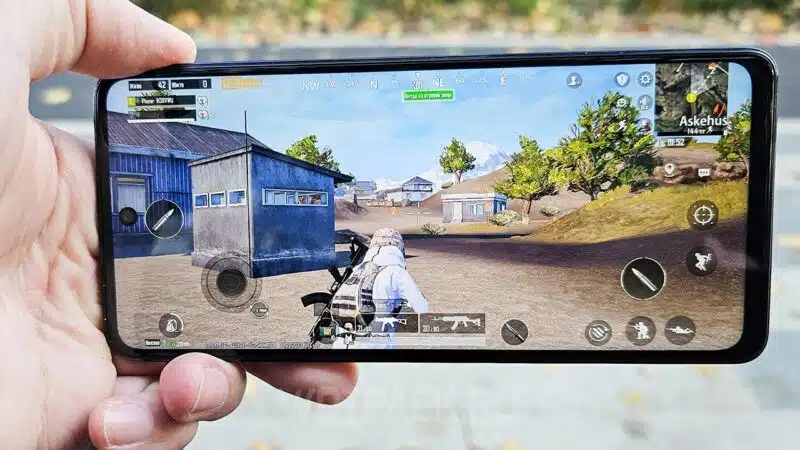
For a pre-made version, check out our collection of pubg mobile control codes with full gyro — they work perfectly as a base and you can tweak the sensitivity from there.
2. The 4-Finger Claw Compact – Optimised for Small Screens
Many Brazilian players use devices like the Moto G series or Samsung A series with 6.5-inch screens. This code shrinks all buttons to 80% size and positions them close to the edges. It uses a 4-finger claw: index left for scope, index right for fire, thumbs for movement and camera. The result? You can hit jiggle peaks and crouch-sprays without stretching your fingers. It’s especially effective for close-range SMG fights, which Brazilians love.
3. The ‘Mata-Mata’ (Killer) 3-Finger Layout
Not everyone wants a full claw. This Brazilian 3-finger layout uses a left index for fire, right thumb for scope + movement, and left thumb for joystick. It’s simple but deadly. The key is button placement: the fire button is oversized and positioned just above the joystick, so you can tap quickly without moving your thumb. The scope button is slightly transparent to avoid clutter. This code is a must-try if you’re transitioning from thumbs to claw — a popular step in Brazil’s casual competitive scene. You can find more 3-finger options in our pubg mobile control codes for beginners.
4. DMR Domination – Tap Fire Control Code from Brazil
Brazilians love the Mini14 and SLR. This code optimises button placement for quick tap fire: the fire button is split into two zones — one for scope and one for ADS fire. The right side has a dedicated ‘hold breath’ button right next to the scope. Gyro is calibrated for slow, precise movements. If you’re struggling to land consecutive shots with a DMR, this Brazilian code simplifies the finger movements. It’s closely related to the pubg control codes for dmr control we’ve tested, but with a Brazilian twist on the sensitivity values.
5. The Peek-and-Shoot Specialist – Aggressive Jiggle Peek
Brazilian players are masters of the jiggle peek — exposing only a pixel of their character while firing. This code places lean buttons (left and right) at the top corners of the screen, accessible by your index fingers. Fire is mapped to the left index as well, so you can lean, fire, and unpeek in one fluid motion. It’s a high-skill layout but devastating once mastered. If you want to incorporate peek-and-shoot without changing your whole setup, use this code as a reference. For other peek-focused layouts, see our pubg control codes for peek and shoot.
6. The ‘Gringo’ Layout – American Servers, Brazilian Touch
This code is a hybrid — it borrows the popular American 4-finger claw but adjusts the button opacity and size for Brazilian devices. The scope button is 10% larger, and the crouch button is moved to the top right near the joystick. The result is a layout that feels familiar but optimized for the Latin American playstyle: more aggressive, less passive. It’s a great starting point if you want to try a new layout without a steep learning curve. You can copy this code and share it with friends using our pubg control codes layout share feature.
7. The ‘Pé na Cova’ (Foot in the Grave) – Shotgun & SMG Rush
If you’re the type to hot drop at Bootcamp or Paradise Resort, this code is for you. It’s built for hip-fire and rush plays. The fire button is huge (120% size) and placed right in the center bottom. The scope button is tiny and semi-transparent, because you won’t need it up close. The joystick area is expanded to allow easy sliding. Brazilian rushers swear by this layout — it lets you move and spray with minimal finger travel.
8. The Classic 6-Finger Claw – For the Dedicated
Brazil has a growing number of 6-finger claw players. This code assigns each finger a dedicated role: left ring for lean left, left middle for fire, left index for scope; right ring for lean right, right middle for jump, right index for crouch. The buttons are spaced to avoid accidental touches. It takes practice but offers unmatched control. If you’re already on a 4-finger claw and want to level up, try this Brazilian configuration. For more 6-finger options, see our pubg control codes for 6 finger, but this one is tailor-made for the Brazilian meta.
Before you jump into a match, remember to adjust your ADS sensitivity and gyro settings to match your device. Each code is a starting point — tweak the button opacity and size to your liking. And if you’re on an older phone, consider using a pubg control layout code that reduces transparent buttons to improve performance. Brazilian players have proven that skill matters more than hardware, and these codes are your shortcut to playing like them. Try one today and feel the difference.



