
The ASUS ROG Phone isn’t just another gaming phone—it’s a beast built for PUBG Mobile. With its customisable AirTriggers, 165Hz AMOLED display, and powerful cooling, you’ve got the hardware. But to truly dominate, you need control codes that leverage every bit of that hardware. We’ve combed through pro layouts, scrim player settings, and community favourites to bring you the 8 best PUBG control codes for ROG Phone in 2025. Each code is hand-picked for AirTrigger compatibility, gyro optimisation, and that buttery-smooth 90fps feel. Ready to unlock your ROG’s full potential? Let’s dive in.
1. ROG 4-Finger Claw – The All-Rounder
The classic 4-finger claw gets a ROG twist. This code maps the left AirTrigger to scope (hold), right AirTrigger to fire, and places lean buttons on the top-right of the screen for thumb usage. The left thumb handles movement and crouch, while the right thumb controls aim and weapon switch. It’s the perfect balance of speed and control, letting you peek-shoot and hip-fire like a pro. Recommended for all game modes. To import, go to Settings > Controls > Layout Management > Import from Code and paste the code.
2. AirTrigger Spray Master – For Laser-Like AR Spray

If you struggle with recoil control, this code is a game-changer. It uses the left AirTrigger for a custom gyro activation toggle—press and hold to activate gyro for fine-tuning your spray. The right AirTrigger remains fire. The layout reduces vertical recoil by placing the fire button at the bottom of the right side, allowing your thumb to naturally pull down. This code is especially effective with the M416 and SCAR-L. For more spray-specific setups, check out our dedicated spray control codes guide.
3. ROG 5-Finger Layout Code – Maximum APM
For those who want to push their APM to the limit, this 5-finger layout uses both AirTriggers plus three additional screen buttons. The left AirTrigger handles scope, the right AirTrigger jumps, and the screen houses fire, crouch, and lean left. The extra finger (right ring finger) hits the lean right button placed on the top-right edge. It takes practice but offers unparalleled movement. You can find the exact code in our 5-finger layout code collection.
4. Quick Peek & Shoot Code – For Cover Shooting
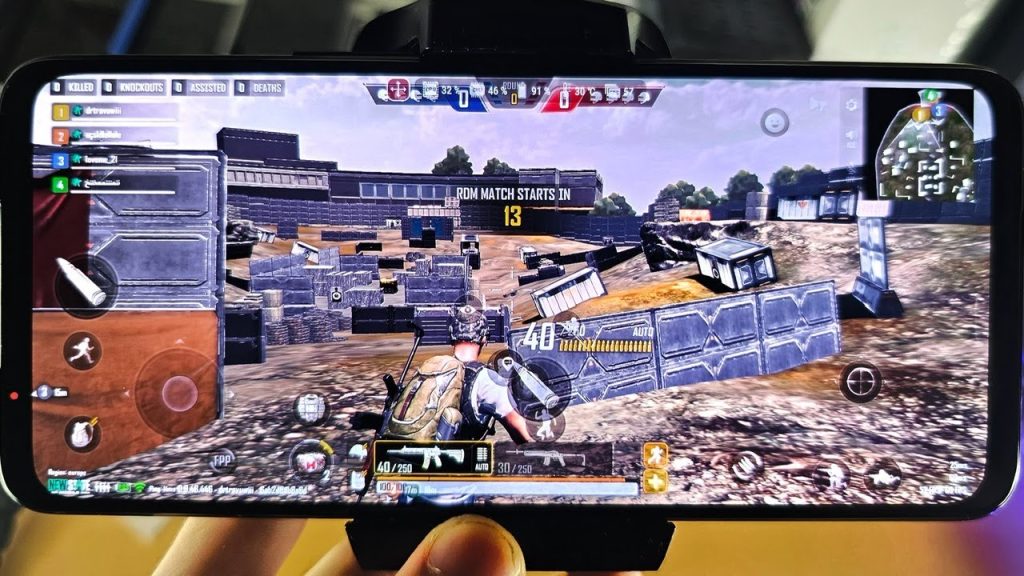
Peek-shooting is essential for high-skill lobbies. This code binds the left AirTrigger to the ‘peek right’ function (while pressing it) and the right AirTrigger to fire. The fire button is placed near the peek button so you can squeeze both triggers rapidly. It also sets the gyro sensitivity to 300% while using a 4x scope for stable follow-up shots. This layout is borrowed from top scrim players—check out our scrim player codes for more.
5. Gyro Scope Steadiness Code – For Snipers and DMRs

Sniping on a phone is tough, but the ROG Phone’s high-refresh screen and gyro make it possible. This code maps the right AirTrigger to fire and leaves scope to the left button. It also reduces the scoped gyro sensitivity to 150% to eliminate jitter, while increasing the non-scoped gyro to 400% for quick flicks. The layout moves the fire button slightly to the left to give more room for the right thumb to stabilise. For more sniper layouts, see our advanced control codes.
6. Jump & Shoot Bunny-Hop Code – For Aggressive Peeking

Bunny-hopping while shooting is a deadly combination. This code sets the left AirTrigger to jump and the right AirTrigger to fire. The jump button is placed in the centre of the screen, making it easy to chain jumps. The crouch button is also positioned nearby so you can land into a slide. It’s aggressive but effective in close-quarters. We’ve covered similar setups in our latest control codes article.
7. AKM Spray Code – Recoil Taming

The AKM is powerful but kicks like a mule. This code is designed to bring it under control. It uses the left AirTrigger for a macro that toggles a high gyro sensitivity (500%) only when spraying. The right AirTrigger remains fire. The layout also moves the aim button to the top-left of the screen to reduce thumb travel. The result? A laser beam that shreds through enemies at mid-range. For other AKM-specific codes, check our AKM spray code guide.
8. ProScrim Layout – The Complete Package
This is the closest you’ll get to a pro tournament setup without attending scrims. It’s a 5-finger layout with both AirTriggers and three additional buttons for crouch, jump, and lean. The left AirTrigger toggles scope, the right AirTrigger fires, and the screen buttons are arranged for minimal hand movement. It also includes a custom Quick Scope sensitivity curve. This code is frequently updated and shared among the pro community. You can import it and tweak to your liking. For the most up-to-date versions, follow our best Android control codes page.
How to Set Up Control Codes on Your ROG Phone
Importing control codes is simple. In PUBG Mobile, go to Settings > Controls > Layout Management. Tap ‘Import from Code’ and enter the code string (a mix of letters and numbers). The layout will automatically overwrite your current one. Make sure your AirTrigger settings (Settings > AirTriggers > Game Settings > PUBG Mobile) are set to ‘Single Action’ for each trigger. You can also customise the trigger sensitivity and activation zone in the Armoury Crate app.
These 8 codes cover everything from casual play to competitive scrims. Whether you prefer a simple 4-finger claw or an advanced 5-finger layout, your ROG Phone is now a PUBG Mobile weapon. Experiment with each code and adjust the gyro sensitivity to match your play style. The perfect setup is the one that feels natural to you. Update your codes regularly as the game evolves—check our latest control codes for new additions.



